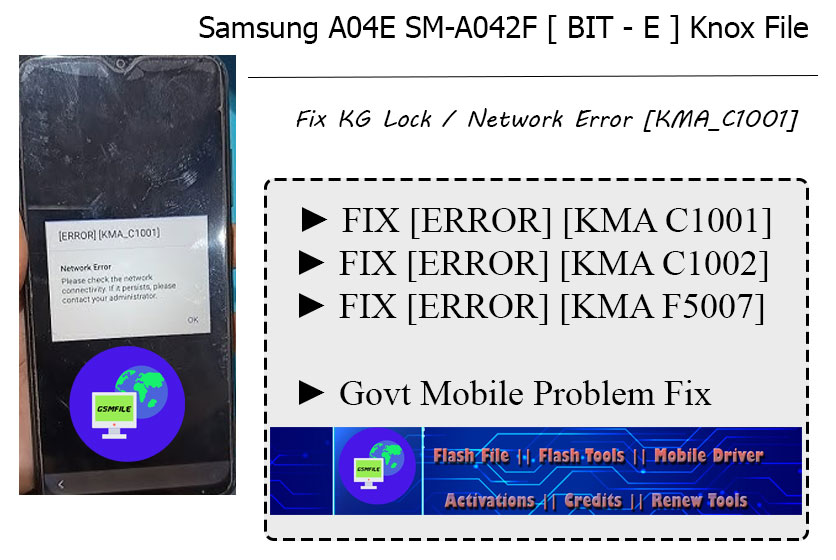
Samsung smartphones have a lot of security features to keep the phone safe from people who should not be using it. One of these features is the KG Lock or Knox Guard Lock. Sometimes users see an error message on their phone that says “[ERROR] [KMA_C1001] Network Error. Please check the network connectivity.” This problem usually happens on the Samsung A04E. It often appears after the phone has been reset or there is a problem with the firmware or when the phone cannot connect to Samsungs Knox server.
If you are having this problem the Samsung A04E KG File can help fix it. This post will explain why this error happens and how the Samsung A04E KG File can fix it safely.
Why the Samsung A04E KG Lock Error Appearsonly
The KMA_C1001 network error is related to Samsungs Knox Guard system. Knox Guard is used to protect phones that are owned by companies or have security rules. When the phone cannot connect to Samsungs servers it may get. Show a network error message.
There are a reasons why this problem happens:
First the phone may have been reset to its factory settings without removing the old Samsung account or security settings. In these cases Knox Guard may think that someone is trying to do something they should not be doing.
Second the phones firmware may be. Some system files may be missing. If the system files get corrupted the phone may not be able to connect to Knox services, which causes the KG error.
Another reason might be that the phone cannot verify its status with Samsungs servers. Sometimes the phone tries to check its status but it cannot because of network problems or because it is in a different region or because the system settings are not correct.
Lastly installing the firmware version can also cause this problem. If the wrong firmware is installed it can cause errors in the security system, which results in the network error.
How the Samsung A04E KG File Fixes the Problem
The Samsung A04E KG File is a file that fixes the phones security settings and makes the system stable again. When this file is installed correctly it removes the Knox Guard restriction and fixes the KMA_C1001 error.
This file works by fixing the phones system files and restoring the system components that connect to Samsungs security services. After the file is installed the phone can start up normally without any problems with the KG lock.
Technicians usually use this file with tools like Odin or other Samsung tools. Once the file is installed on the phone the system settings are. The Knox Guard error goes away.
Benefits of Using the Samsung A04E KG File
Using the Samsung A04E KG File has several benefits. It helps fix the phones operating system removes the network error message and makes the phone work again. This file is very useful for people who repair phones and often deal with Samsung A04E phones that have KG lock problems.
Another advantage is that installing the firmware can make the system stable and prevent more software problems. After the repair is done the phone usually starts up normally. Can connect to networks without showing the error screen.
The Samsung A04E KG File is a solution, for fixing the KMA_C1001 network error caused by KG lock problems. This problem often happens because of firmware corruption, security verification failure or an unauthorized reset. By installing the Samsung A04E KG File you can fix the system configuration and remove the lock.
If your Samsung A04E is stuck on the Knox Guard network error screen using the Samsung A04E KG File is one of the ways to fix the phone and make it work normally again. Always make sure to use the firmware version and the right flashing tools to avoid more system problems.
Flash File Feature/Benifits
Hang On Logo Problem Fix ( First Check Hardware )
Restart Problem Fix
Remove Screen lock Problem
Call Auto Cut Problem Solve
Application Bug problem Fix
Samsung A04E KG File Info
Name :- SAMSUNG A04E[ BIT-E ]KNOX OFF Tested By GsmFile.in.rar
Size :- 2.82 GB
Format :- .ZIP
Status :- Paid
Download Source :- Mediafire
Samsung A04E Specifications
OS :- Android 12
Processor :- Mediatak MT6765
Ram :- 3/4/6 GB
Storage :- 32/64/128GB
Resolution :- 720 x 1600
Battey :- 5000 mAH
Specifications Source www.gsmarena.com
How To Use Samsung A04E File
➡ First You Need To Download This File.
➡ After Download Done Just Contact Us For Unlocking.
➡ Charges 300₹ For File ( if You Need Additional Services Charges Apply)
➡ After Zip Unlock Just Open Flash Tool ( Odin Flasher ) And Load File
➡ Make Sure Drivers Properly Installed And Connect Device With Download Mode .
File Is Not Free Contact For Purchase  WhatsApp Group
 Join Group
  Telegram Group
 Join Group WhatsApp Support Live Chat
 Before performing any flashing process on your phone, you should collect all the information before doing it.This is an educational post, do not use it for any wrong purpose.
![Motorola Moto M XT1633 Tool DL Image Fail! [Solved]](https://gsmfile.in/wp-content/uploads/2023/10/moto-m-218x150.png "Motorola Moto M XT1633 Tool DL Image Fail!")